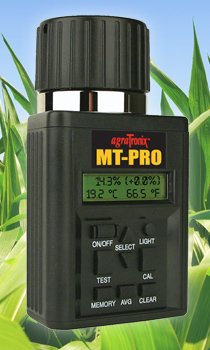
MT-PRO Grain Moisture Tester -
Multi-Grain, Multi-Language with Dual Calibration
The MT-PRO main menu allows the user to customize the tester to his own operation by selecting from 39 grain scales and 7 languages (English is the default). The MT-PRO now features 2 simple methods for adjusting grain moisture calibration using Easy Single-Point or Precision Multi-Point™.
Product Features
• Direct readout for more than 40 different grain scales
• Easy Single-Point or Precision Multi-Point™ calibration for each grain scale
• Memory button for saving tests to be averaged
• Backlit display for nighttime use
• Built-in calibration button
• Average button for displaying the average of saved test results
• Multi-language display - English, Spanish, French, German, Italian, Portuguese and Swedish
• Higher-frequency, capacitive circuit improves accuracy
• Enhanced temperature compensation circuit
• 7”H x 4”W x 3”D, 1.45 lbs
Specifications
• Operating Range (Moisture): 5% to 40% depending on grain tested
• Operating Range (Temperature): 32° to 113°F (0° to 45°C)
• Repeatability: ± 0.5% in normal moisture range for stored grain
• Accuracy: ± 0.5% in normal moisture range for stored grain
• Display Resolution: 0.1% moisture
• Battery: Two 9 volt batteries included
Product Manual
http://www.agratronix.com/moisture-testing/images/tester-manuals/08125-manual.pdf
Common Product Questions
http://www.agratronix.com/moisture-testing/08125-Profaqs.html
Operation
OPERATING PROCEDURE –
NORMAL OPERATION
1. Remove cap (A) and inspect test cell (B) to be sure that it is clean and empty.
2. Press ON-OFF button (C) to turn on tester. The display (D) will show ALWAYS AVERAGE
3 TESTS for approximately 7 seconds, then will show ALFALFA (initial operation) or the name of the last grain tested.
3. When the grain to be tested has been selected using the SELECT arrows (E), fill the test cell (B) even to the top of the cell with sample to be
tested.
4. (For Initial Test Only) Before
tightening pressure cap, turn
on tester and allow to warm up for
30 seconds before attempting first
test.
5. Replace cap (A) and tighten until
pressure-indicator screw (F) is
flush with the top of cap (A). (Use
Finger-Flush test as illustrated.)
6. Immediately press TEST button (G). The words TESTING will be displayed for
about 10 seconds, while the tester compensates for temperature. The moisture
% and temperature will then be displayed for about 10 seconds.
7. The tester will then return to displaying the name of the last grain tested. Empty
the test cell and refill with a fresh sample and test again.
NOTE: Take at least three readings of new grain from the sample collected and average the results
TO DISPLAY TEMPERATURE IN THE CELL
To display the temperature in the cell, press either the up or down arrow on the SELECT button (A) to index forward or backward through the grain (function) menu until the word
TEMPERATURE is displayed.
When TEMPERATURE is displayed, press TEST
button (B). The current temperature in cell will be
displayed in both F˚ and C˚. Temperature will be
displayed for a few seconds then will return to the
main grain menu.
NOTE: If the tester and grain are different
temperatures, the mass of the metal
tester will quickly warm or cool the grain.
Therefore, the temperature reading is the cell temperature, not
necessarily the temperature of the grain before being put in the cell.
TO AVERAGE TEST RESULTS
1. When testing grain, the test result is displayed for about ten seconds. During the
period that the test moisture % and temperature is displayed, press the MEMORY button
(A). The tester will acknowledge that it has
entered the reading into memory, by displaying the current average and then the number
of stored readings. Up to 20 readings can be
stored into memory. If the maximum number
of readings has been reached, the tester will
not allow any more readings to be stored.
NOTE: Averaging is stored for one grain only. When
a test for a new grain is performed, existing averaging data for the previous grain is erased when the new grain’s averaging data is taken. Averaging data is retained even if batteries are removed.
2. Press the AVG button (B) to display the average of all results entered for the grain being tested.
3. To clear the averaging, press the AVG button. The current average will be displayed. Then press the CLEAR button (C) and the tester will then display 0.0% ( 0 ). This indicates that the averaging has been cleared
Grains MT-PRO Measures:
alfalfa/lucerne
allspice
barley
Beet
bran
buckwheat
camelina
caraway
cardemom
chickpea
chickpea, desi
chili powder
chili crushed
chili small cayenne
cloves
cock's foot
coffee, raw
coriander
corn
corn starch
cotton, fiber
cotton, fiber+seed
cumin
durum (hard) wheat
eggs powder
fennel
fescue
field bean
field pea
flax, fiber
hemp, fiber
hop
juniper berries
kentacy bluegrass
lentil, green
lentil, red
linseed
Lupins Yellow
lupine, white
marjoram
meadow fescue
meadow grass
milk powder
milk thistle
millet
mineral salt
molasses, cut
mung bean
mustard
naked oats
nelken
oats
oilseed sunflower
onion grit
oregano
paddy rice
paprika green
paprika red
parsley
peanut
peanut with skin
peat
pepper black
pepper white
plaster, ground
pollen
poppy
Popcorn White
Popcorn Yellow
pumpkin seed
purple peanut
radish
rapeseed
rape/canola
red clover
red fescue
rice in husky
rye
rye flour
ryegrass
safflower
sawdust
semolina
sesame
small red bean
sorghum
soybean
spinach
sunflower
teff
timothy
Fescue
triticale
walnut
wheat
wheat flour
Dactyl
white clover
white lupine